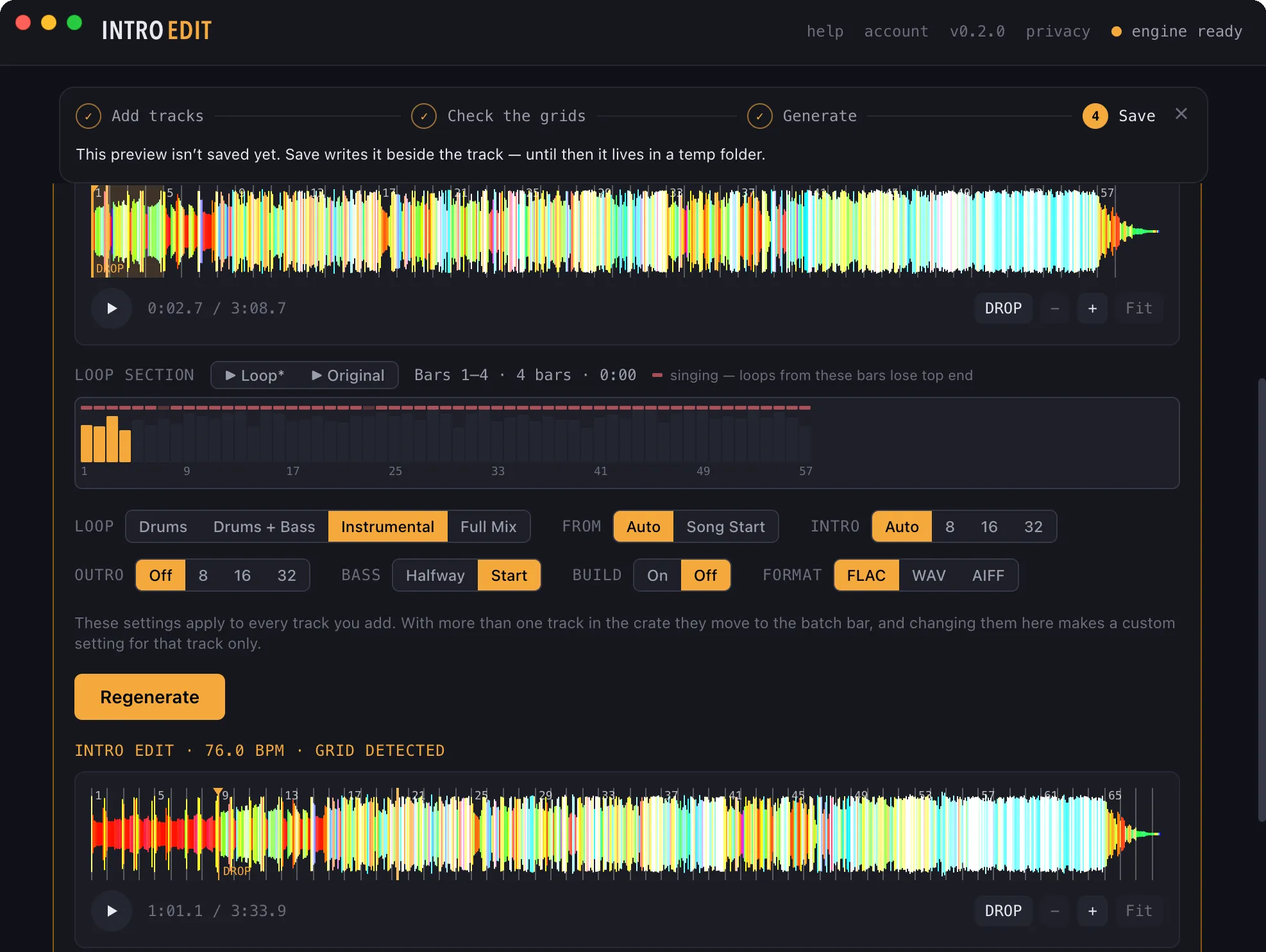
16-bar intro · looped from the song’s own bars · bass in at bar 9then your original, untouched
DAWs and DJ production tools let you create an intro edit. IntroEdit creates it
for you — a crate at a time.
One track, open
Your original on top, with the drop marked. The song’s bars below it — the ones with singing flagged,
the four that feed the loop lit up. One row of choices. And the finished edit underneath, ready to
play before you save it.
IntroEdit 0.2.0 on a Mac · the strip across the top is the first-run guide; it goes away when you’re done with it
Why it’s different
Your original, untouched
Stem separation is used for one thing: building the intro. From the drop on, every sample is your file — at its own sample rate and bit depth. For a lossless source the body is tested bit-identical. If the app ever has to touch it (a lossy file that decodes past full scale gets one small gain trim), it tells you exactly how much.
The whole crate, not one track
Drop a folder. Every track is analysed as it lands, each row says where its beatgrid came from, and the app flags only the ones it has a concrete reason to doubt. Walk the crate from the keyboard, fix the odd grid, Generate All, Save All.
It finds the 1 — and lets you check it in seconds
A Serato beatgrid in the file is used exactly as you set it. Otherwise the grid is detected, and you verify it by ear with a click track, tap the 1, nudge by a beat or 5 ms, or zoom in and put the bar line on the kick with one press. A grid you corrected is never quietly re-fitted.
Built from the song itself
The intro is a loop of the record’s own bars. No sample packs, no generic drum loops, nothing synthesised. It prefers bars where nobody is singing — where the loop simply is the original — and tells you how clean the bars it used are.
The defaults aren’t guesses: intro length, what’s in the loop, when the bass comes in and whether
there’s a build were set by measuring 37 record-pool intro edits. “Auto” tells you what it decided —
Auto → 16 bars · bass in at bar 9 · 4-bar loop from bar 12.
How it works
1
Find the grid
A Serato beatgrid in the tags wins. Otherwise beats and downbeats are detected, sanity-checked (bars must be four beats) and fitted to a constant tempo.
2
Separate once
The track is separated so the loop can be the full instrumental, drums + bass, or drums.
3
Pick the bars
A 2, 4 or 8-bar section that is full, bright and — wherever the record allows — has no singing on it. Or pick them yourself and audition A/B against the original.
4
Build the intro
8 bars under 100 BPM, 16 otherwise (or 8 / 16 / 32 on request), click-free and drift-free, at the body’s level. On longer intros the bass comes in halfway.
5
Drop on the 1
The original enters on a downbeat with a hard cut. The few milliseconds of smoothing a cut needs come from the intro side — never from the first samples of your track.
6
Render and tag
FLAC, WAV or AIFF, with tags and cover art carried over and the title marked (Intro Edit). Saving never overwrites a file.
All of it runs on your computer. Your music is never uploaded — see the privacy policy for exactly what is and isn’t sent.
What it doesn’t do (yet)
Better you hear it here than find out at a gig.
Steady 4/4 only
Live drummers, tempo changes and other meters are out of scope. A track whose tempo doesn’t hold steady is flagged rather than given a fake grid.
It can still get the 1 wrong
Against 75 tracks with a hand-tuned Serato grid, detection matched the tempo on 72 and put the 1 where Serato does on 66 of 68. Good, not perfect — which is why checking the grid is fast, not optional.
Wall-to-wall vocals are hard
A song with singing on almost every bar has no clean bars to loop, and removing the vocal takes some of the hi-hats with it. The app says so when it happens.
Not public yet
IntroEdit is in a private beta with a handful of invited DJs. Right now the beta runs on Macs with Apple silicon (M1 or newer, macOS 14 or newer). Windows 10 and 11 are next; Intel Macs aren’t supported.
PRIVATE BETA
IntroEdit isn’t public yet
A small group of working DJs is testing it. There is no download here: testers are invited one at a
time, and each agrees to a short confidentiality agreement the first time they open the app. If you’d like to be one of
them, leave your address and tell us two things.
Two things decide it. What you play on and which computer you have —
for a Mac, which chip. They tell us whether you can test today.
A person answers. There’s no waiting-list robot and no newsletter. We
use your address to reply to you, and for nothing else.
It runs on your own machine. About 1 GB once installed, plus the audio
models it downloads the first time. After that it works offline.